Effortless Test Execution, Redefined With HeadSpin TEM.

HeadSpin Test Execution Management (TEM) centralizes mobile test execution in the cloud, allowing teams to upload apps and tests to a single platform and instantly execute them directly from the cloud.
TEM Hero Image

Introducing HeadSpin TEM

With TEM, teams can run native mobile test suites on real devices in the cloud. It removes reliance on local machines or CI/CD environments, enabling teams to upload apps, attach test runners, and monitor results all from a single platform. QA teams can access TEM either through the API or directly from the HeadSpin UI.
Upload Your App
1

Upload Your App

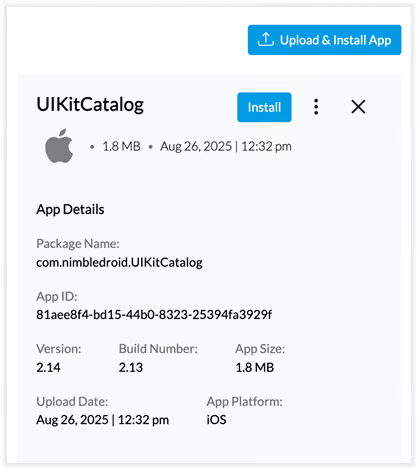
Simply upload your app to HeadSpin Cloud through the App Management page or Remote Control UI or via the API from your CLI to get started.
2

Add Your Test Runner

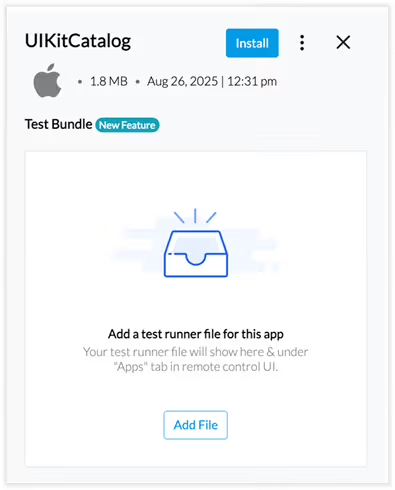
Attach a test runner file to the uploaded app. This connects your existing test suites directly with HeadSpin’s real devices.
Add Your Test Runner
Run Targeted or Full Test Suites
3

Run Targeted or Full Test Suites

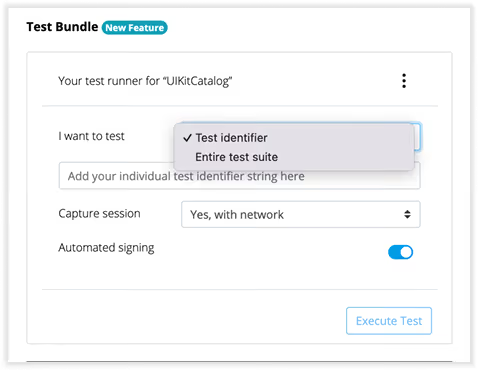
Run a single test case for a quick check or the entire suite for complete regression analysis. With device controls locked during execution, you get clean test execution without accidental interruptions or noise in the results.
4

Get Results and Session Insights

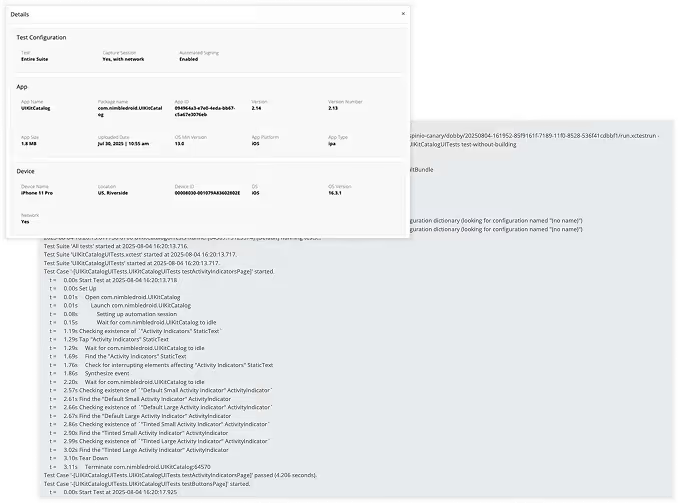
Get instant visibility into logs as soon as execution ends, with results available in the terminal, HeadSpin UI, or Waterfall UI (session capture has to be enabled), depending on the method of execution.
Get Results and Session Insights
Multiple devices testing
1

Upload Your App

Simply upload your app to HeadSpin Cloud through the App Management page or Remote Control UI or via the API from your CLI to get started.

Multiple devices testing
2

Add Your Test Runner

Attach a test runner file to the uploaded app. This connects your existing test suites directly with HeadSpin’s real devices.

Multiple devices testing
3

Run Targeted or Full Test Suites

Run a single test case for a quick check or the entire suite for complete regression analysis. With device controls locked during execution, you get clean test execution without accidental interruptions or noise in the results.

Multiple devices testing
4

Get Results and Session Insights

Get instant visibility into logs as soon as execution ends, with results available in the terminal, HeadSpin UI, or Waterfall UI (session capture has to be enabled), depending on the method of execution.

Features of TEM

Centralized App &Test Runner Hub
Centralized App &Test Runner HubCentralized App &Test Runner Hub
Manage all apps and test runners in one place for easy tracking, updates, and reuse.
Flexible Test Execution
Flexible Test ExecutionFlexible Test Execution
Run full suites or target specific tests to shorten execution time and speed up feedback loops.
One-Click Test Runner Setup
One-Click Test Runner SetupOne-Click Test Runner Setup
Add new test runners quickly without configuration delays, letting teams focus on testing.
Instant Metadata Access
Instant Metadata AccessInstant Metadata Access
View available builds, test scripts, and app versions to select the right assets for each test.
Real-Time Functionality & Performance Tracking
Real-Time Functionality & Performance TrackingReal-Time Functionality & Performance Tracking
Monitor functional outcomes and performance metrics together to detect regressions early.

Ready to simplify test management and speed up releases? — Connect with HS Experts!